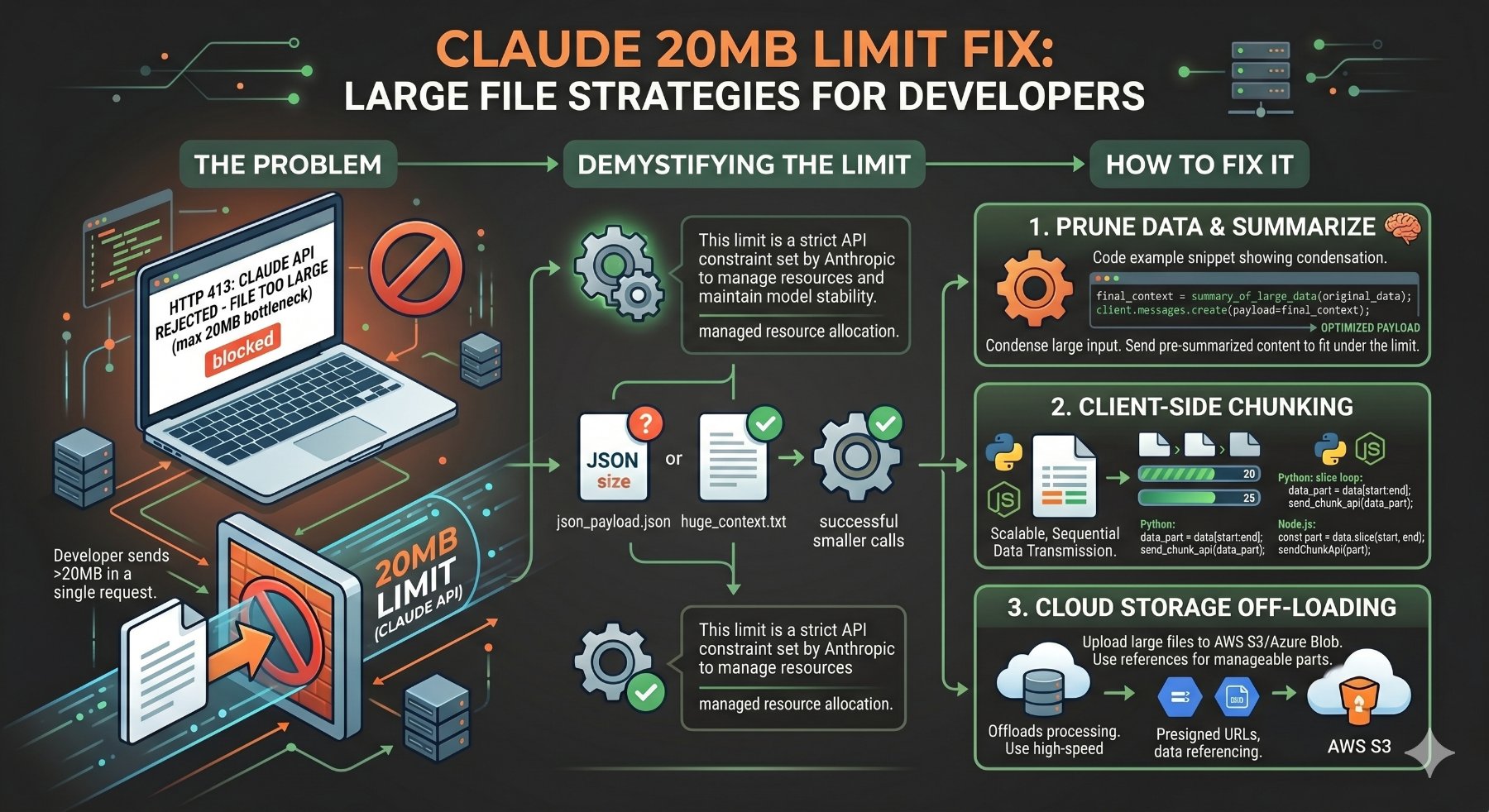
Bypassing the 20MB Claude API Limit: Strategies for Large File Processing
Hitting the "Claude request too large (max 20mb)" error is a common roadblock when integrating large datasets or documents with AI models. It’s frustrating, especially when you're dealing with substantial enterprise data, extensive codebases, or high-fidelity media. This isn't just a Claude-specific issue; it's a fundamental challenge in API design and interaction, driven by network efficiency, memory management, and security considerations. Let's cut to the chase: you need to process large files with an AI, and a 20MB limit is standing in your way. We'll explore robust, production-grade strategies to overcome this, focusing on client-side preparation and intelligent interaction patterns.
Understanding the Constraint: Why 20MB?
API limits aren't arbitrary. They're put in place for several critical reasons:
- Network Efficiency: Large single requests can hog network resources, increasing latency and reducing throughput for other users.
- Memory Management: Processing a 20MB file in memory for every request can quickly exhaust server resources, especially with concurrent requests.
- Security & Abuse Prevention: Limits help mitigate DDoS attacks and prevent users from accidentally or maliciously overwhelming the service.
- API Design Philosophy: Many AI models are designed for iterative, conversational interactions rather than single massive dumps of data.
For you, this means adapting your data ingestion pipeline. We need to break down large problems into smaller, manageable pieces that fit within the API's constraints.
Strategy 1: Smart Compression – The First Line of Defense
Before you even think about splitting files, consider compression. For text-heavy data (code, logs, documents), lossless compression can significantly reduce file size without losing any information.
Lossless Compression for Text/Code
Tools like Gzip and Zstandard (Zstd) are excellent choices. Gzip is ubiquitous and built into most systems, while Zstd, developed by Facebook, often offers better compression ratios and significantly faster compression/decompression speeds, especially for larger files.
When to use them:
- Gzip: If simplicity and broad compatibility are paramount. Built-in Python support makes it easy.
- Zstd: For maximum performance and better compression ratios, particularly when dealing with truly massive text files or when CPU cycles are at a premium for compression/decompression. Requires an external library.
Here’s a Python example demonstrating both:
import gzip
import zstandard as zstd
import os

def compress_file_gzip(input_filepath, output_filepath):
    """Compresses a file using gzip."""
    with open(input_filepath, 'rb') as f_in:
        with gzip.open(output_filepath, 'wb') as f_out:
            f_out.writelines(f_in)
    print(f"Gzip compressed {input_filepath} to {output_filepath}")

def decompress_file_gzip(input_filepath, output_filepath):
    """Decompresses a gzip file."""
    with gzip.open(input_filepath, 'rb') as f_in:
        with open(output_filepath, 'wb') as f_out:
            f_out.writelines(f_in)
    print(f"Gzip decompressed {input_filepath} to {output_filepath}")

def compress_file_zstd(input_filepath, output_filepath, compression_level=3):
    """Compresses a file using zstandard."""
    dctx = zstd.ZstdCompressor(level=compression_level)
    with open(input_filepath, 'rb') as f_in:
        with open(output_filepath, 'wb') as f_out:
            dctx.copy_stream(f_in, f_out)
    print(f"Zstd compressed {input_filepath} to {output_filepath}")

def decompress_file_zstd(input_filepath, output_filepath):
    """Decompresses a zstandard file."""
    dctx = zstd.ZstdDecompressor()
    with open(input_filepath, 'rb') as f_in:
        with open(output_filepath, 'wb') as f_out:
            dctx.copy_stream(f_in, f_out)
    print(f"Zstd decompressed {input_filepath} to {output_filepath}")

if __name__ == "__main__":
    # Create a dummy large text file for testing
    dummy_file_path = "large_document.txt"
    with open(dummy_file_path, "w") as f:
        for i in range(500000): # ~20MB of text
            f.write(f"This is line number {i}. It contains some repetitive text to simulate a large document.\n")
    print(f"Created dummy file: {dummy_file_path} ({os.path.getsize(dummy_file_path) / (1024*1024):.2f} MB)")

    # Gzip compression
    gzip_output_path = "large_document.txt.gz"
    compress_file_gzip(dummy_file_path, gzip_output_path)
    print(f"Gzip size: {os.path.getsize(gzip_output_path) / (1024*1024):.2f} MB")

    # Zstd compression
    zstd_output_path = "large_document.txt.zst"
    compress_file_zstd(dummy_file_path, zstd_output_path)
    print(f"Zstd size: {os.path.getsize(zstd_output_path) / (1024*1024):.2f} MB")

    # Clean up
    os.remove(dummy_file_path)
    os.remove(gzip_output_path)
    os.remove(zstd_output_path)
    print("Cleaned up dummy files.")
To run the Zstd example, you'll need to install the library: pip install python-zstandard.
Considerations for Binary Data
If your "file" is already a binary format like a JPEG, MP4, or a pre-compressed archive, applying Gzip or Zstd on top is usually counterproductive. These formats are already highly optimized for size, and re-compressing them will yield minimal gains or even increase file size due to compression overhead. In such cases, you need to move directly to external storage or chunking.
Compression Method Comparison
| Feature | Gzip | Zstandard (Zstd) |
|---|---|---|
| Compression Ratio (Typical Text) | Good (e.g., 3-5x) | Excellent (e.g., 4-7x, often better than Gzip) |
| Compression Speed | Moderate | Very Fast (often significantly faster than Gzip) |
| Decompression Speed | Moderate | Extremely Fast (often 5-10x faster than Gzip) |
| CPU Usage | Moderate | Low-Moderate (highly tunable) |
| Library Support | Built-in to Python, widely supported | Requires python-zstandard, growing support |
| Use Case | General purpose, web assets, basic archiving | High-performance archiving, real-time streaming, large data processing |
Strategy 2: External Storage and Reference – The Robust Solution
For files that are inherently large (even after compression) or binary, the most robust and scalable approach is to upload them to a cloud storage service (like AWS S3, Google Cloud Storage, or Azure Blob Storage) and then send a reference (e.g., a URL) to the Claude API. This offloads the heavy lifting of file transfer from your direct API call.
Implementation Steps
- Upload to Cloud Storage: Your application uploads the large file to a designated bucket/container in your chosen cloud provider.
- Generate Pre-signed URL (Optional but Recommended): For temporary, secure access, generate a pre-signed URL. This grants time-limited permission to access the object without requiring permanent public access or exposing your cloud credentials.
- Send URL to Claude API: Instead of the file content, you send the pre-signed URL (or a permanent public URL, if appropriate) to the Claude API, potentially within a prompt or a specific API parameter designed for external resources. Claude's API might then fetch the content directly from your storage.
Code Example: Python with AWS S3 (boto3)
This example assumes you have boto3 installed (pip install boto3) and AWS credentials configured.
import boto3
from botocore.exceptions import ClientError
import logging
import os
from datetime import datetime, timedelta

# Configure logging
logging.basicConfig(level=logging.INFO)

def upload_file_to_s3(file_name, bucket, object_name=None):
    """Upload a file to an S3 bucket.

    :param file_name: File to upload
    :param bucket: Bucket to upload to
    :param object_name: S3 object name. If not specified then file_name is used
    :return: True if file was uploaded, else False
    """
    if object_name is None:
        object_name = os.path.basename(file_name)

    s3_client = boto3.client('s3')
    try:
        s3_client.upload_file(file_name, bucket, object_name)
        logging.info(f"Successfully uploaded {file_name} to s3://{bucket}/{object_name}")
    except ClientError as e:
        logging.error(e)
        return False
    return True

def generate_presigned_url(bucket_name, object_name, expiration_seconds=3600):
    """Generate a pre-signed URL to share an S3 object.

    :param bucket_name: Name of the S3 bucket
    :param object_name: Name of the S3 object
    :param expiration_seconds: Time in seconds for the pre-signed URL to be valid
    :return: The pre-signed URL as string. If error, returns None.
    """
    s3_client = boto3.client('s3')
    try:
        response = s3_client.generate_presigned_url(
            'get_object',
            Params={'Bucket': bucket_name, 'Key': object_name},
            ExpiresIn=expiration_seconds
        )
        logging.info(f"Generated pre-signed URL for s3://{bucket_name}/{object_name} with {expiration_seconds}s expiry.")
        return response
    except ClientError as e:
        logging.error(e)
        return None

if __name__ == "__main__":
    # --- Configuration ---
    # Replace with your S3 bucket name
    S3_BUCKET_NAME = "your-pookietech-data-bucket"
    LOCAL_FILE_PATH = "very_large_report.pdf" # Imagine this is your >20MB file
    S3_OBJECT_KEY = f"claude-input/{os.path.basename(LOCAL_FILE_PATH)}"
    URL_EXPIRATION_SECONDS = 3600 # 1 hour

    # Create a dummy file to simulate a large document
    with open(LOCAL_FILE_PATH, "wb") as f:
        f.write(os.urandom(25 * 1024 * 1024)) # 25 MB dummy binary data
    print(f"Created dummy file: {LOCAL_FILE_PATH} ({os.path.getsize(LOCAL_FILE_PATH) / (1024*1024):.2f} MB)")

    # 1. Upload the file to S3
    if upload_file_to_s3(LOCAL_FILE_PATH, S3_BUCKET_NAME, S3_OBJECT_KEY):
        # 2. Generate a pre-signed URL
        presigned_url = generate_presigned_url(S3_BUCKET_NAME, S3_OBJECT_KEY, URL_EXPIRATION_SECONDS)

        if presigned_url:
            print(f"\nPre-signed URL for Claude: {presigned_url}")
            print("You can now send this URL to the Claude API.")

            # Example: How you might send it to Claude (conceptual)
            # claude_api_client.process_document_from_url(url=presigned_url)
            # print("Claude API call (conceptual) initiated with the URL.")
        else:
            print("Failed to generate pre-signed URL.")
    else:
        print("Failed to upload file to S3.")

    # Clean up local dummy file
    os.remove(LOCAL_FILE_PATH)
    print(f"Cleaned up local dummy file: {LOCAL_FILE_PATH}")

    # IMPORTANT: Remember to implement S3 object deletion or lifecycle policies
    # if the data is temporary and should not persist indefinitely.
Security and Lifecycle Management
- Permissions: Ensure your S3 bucket policies and IAM roles are correctly configured to allow your application to upload and potentially generate pre-signed URLs.
- Expiry: Use appropriate expiration times for pre-signed URLs. Don't make them last forever if the data is sensitive or temporary.
- Cleanup: Implement lifecycle policies on your S3 bucket to automatically delete objects after a certain period, or build explicit cleanup routines in your application for temporary files. This prevents unnecessary storage costs and data sprawl.
Strategy 3: Intelligent Chunking and Context Management
Sometimes, you can't use external storage (e.g., strict data residency requirements, or the AI model is designed to receive content directly in the request body, but in smaller pieces). In such cases, breaking the file into smaller, API-compliant chunks becomes necessary. This is particularly relevant for large text documents where the AI needs to process the content sequentially or piece by piece.
Text Chunking Techniques
- Token-based Chunking: The most precise method for LLMs. Split text based on the model's tokenization limits (e.g., 100,000 tokens for Claude 2.1). This requires using the model's tokenizer or an equivalent.
- Paragraph-based Chunking: Split text at natural breaks like paragraphs. Simpler to implement, but chunks might exceed token limits if paragraphs are very long.
- Sentence-based Chunking: Splits text into individual sentences. Can lead to too many small chunks.
- Fixed-size Character Chunking: Simplest, but can cut in the middle of words or sentences, potentially losing semantic context.
- Overlap Strategies: When chunking, it's often beneficial to include a small overlap (e.g., 10-20% of the previous chunk) in the subsequent chunk. This helps maintain context across boundaries and reduces the chance of losing information at the splits.
Code Example: Basic Text File Chunking (Python)
This example demonstrates a simple character-based chunking with overlap. For production, you'd likely use a more sophisticated token-based approach with a library like tiktoken or the specific tokenizer provided by Anthropic.
def chunk_text_file(filepath, chunk_size_bytes=1024 * 1024 * 19, overlap_bytes=1024 * 100):
    """
    Reads a large text file and yields chunks with optional overlap.
    Assumes UTF-8 encoding.

    :param filepath: Path to the large text file.
    :param chunk_size_bytes: Maximum size of each chunk in bytes (e.g., 19MB for a 20MB limit).
    :param overlap_bytes: Number of bytes to overlap between chunks.
    :return: A generator yielding text chunks.
    """
    current_position = 0
    file_size = os.path.getsize(filepath)

    with open(filepath, 'r', encoding='utf-8') as f:
        while current_position < file_size:
            # Determine read start position, accounting for overlap
            read_start = max(0, current_position - overlap_bytes)
            f.seek(read_start)

            # Read the chunk
            chunk_data = f.read(chunk_size_bytes + overlap_bytes)

            # Update current_position for the next chunk
            # If we read from read_start, the next chunk should start after the *actual* chunk_size_bytes
            # relative to the original current_position, effectively creating overlap.
            current_position += chunk_size_bytes

            if not chunk_data: # End of file
                break

            # If an overlap occurred, we need to trim the beginning of the current chunk
            # to only include the *new* part plus the overlap.
            if read_start > 0:
                # Find the actual start of the non-overlapping part
                # This is tricky with character-based chunks and might need adjustment for multi-byte chars.
                # For simplicity here, we'll assume a rough byte-based trim.
                # In a real scenario, you'd likely re-tokenize or use char-based trimming.
                chunk_to_yield = chunk_data[overlap_bytes:]
            else:
                chunk_to_yield = chunk_data

            yield chunk_to_yield.strip() # .strip() to clean up potential leading/trailing whitespace

            # If the chunk read was smaller than expected, it means we hit EOF
            if len(chunk_data.encode('utf-8')) < (chunk_size_bytes + overlap_bytes):
                break


if __name__ == "__main__":
    # Create a dummy large text file
    dummy_text_file = "large_article.txt"
    with open(dummy_text_file, "w", encoding="utf-8") as f:
        for i in range(10000): # Create a file > 20MB
            f.write(f"This is a paragraph about the exciting world of AI and large language models. "
                    f"They are revolutionizing how we interact with information and automate tasks. "
                    f"Understanding API limits and designing robust data pipelines is crucial for "
                    f"production deployments. This is line number {i}.\n\n")
    print(f"Created dummy text file: {dummy_text_file} ({os.path.getsize(dummy_text_file) / (1024*1024):.2f} MB)")

    # Define chunk size (e.g., 19MB to be safe within 20MB limit)
    # And a 1MB overlap
    max_chunk_bytes = 19 * 1024 * 1024
    overlap_bytes = 1 * 1024 * 1024

    print(f"\nChunking '{dummy_text_file}' into ~{(max_chunk_bytes / (1024*1024)):.0f}MB chunks with {(overlap_bytes / (1024*1024)):.0f}MB overlap...")

    chunk_num = 0
    for chunk in chunk_text_file(dummy_text_file, max_chunk_bytes, overlap_bytes):
        chunk_num += 1
        # In a real scenario, you would send this 'chunk' to Claude's API
        # Example: claude_api_client.send_text_chunk(chunk, conversation_id=my_session_id)
        print(f"--- Chunk {chunk_num} (approx {len(chunk.encode('utf-8')) / (1024*1024):.2f} MB) ---")
        # print(chunk[:500] + "...") # Print first 500 chars to verify
        # print(f"Sending chunk {chunk_num} to Claude API...")
        # Simulate API call delay
        # import time
        # time.sleep(0.5)

    print(f"\nFinished processing {chunk_num} chunks.")
    os.remove(dummy_text_file)
    print(f"Cleaned up local dummy file: {dummy_text_file}")
Orchestrating Multi-Part Requests
When sending chunks, you need a strategy to maintain context. This often involves:
- Conversation ID: Pass a unique identifier with each chunk request so the AI can link them to a single session.
- System Prompt/Preamble: Provide an initial prompt that instructs the AI on how to handle multi-part input (e.g., "I am sending you a document in parts. Wait for the 'END_OF_DOCUMENT' signal before summarizing.").
- Sequential Processing: Send chunks one after another. This is simpler but slower.
- Parallel Processing: If the API supports it and context can be managed, you might send multiple chunks concurrently, but this adds complexity and requires careful handling of response order and state.
- Aggregation/Summarization: For very long documents, you might process chunks, summarize them, and then feed those summaries into a final prompt to get a high-level understanding. This is a common pattern for RAG (Retrieval Augmented Generation) systems.
Architectural Considerations for Scalability
Beyond the immediate fix, consider how you'll handle large files at scale:
- Queueing Mechanisms: For asynchronous processing of large files, integrate message queues like AWS SQS, Apache Kafka, or RabbitMQ. Your client uploads the file, sends a message to the queue, and a worker service picks it up for processing.
- Microservices for File Handling: Decouple file upload and processing logic into dedicated microservices. One service handles uploads to cloud storage, another processes chunks, and a third interacts with the AI API.
- Error Handling and Retry Logic: Network glitches or API rate limits can cause failures. Implement robust retry mechanisms (e.g., exponential backoff) and dead-letter queues for failed messages.
- Streaming APIs: If the AI provider offers a streaming API for large inputs, that's often the most efficient method, as it avoids holding the entire file in memory at once. Always check the API documentation for such features.
Choosing the Right Approach
The best strategy depends on your specific use case, data type, and the capabilities of the AI API.
| Factor | Compression | External Storage + Reference | Intelligent Chunking |
|---|---|---|---|
| File Type | Text, code, logs (highly compressible) | Any (binary, text, large archives) | Primarily text (documents, code) |
| File Size | Up to ~100MB (if compression reduces it below 20MB) | Unlimited (scalable) | Unlimited (scalable) |
| API Interaction | Single API call (if compressed file < 20MB) | Single API call (with URL) + initial upload | Multiple API calls (one per chunk) |
| Data Sensitivity | High (data sent directly) | Medium-High (data passes through cloud storage, requires careful access control) | High (data sent directly in parts) |
| Latency | Lowest (single request) | Moderate (upload + API call) | Highest (multiple sequential requests) |
| Cost Implications | Minimal (CPU for compression) | Cloud storage costs, egress fees (if any) | Higher API call costs (per chunk), CPU for chunking |
| Complexity | Low | Medium (cloud integration) | High (context management, orchestration) |
Final Thoughts
Dealing with API limits is a common challenge in distributed systems. The "Claude request too large" error isn't a showstopper; it's an opportunity to design more resilient and scalable data pipelines. For truly large files, the external storage + reference pattern is almost always the most robust. For text, combine it with intelligent chunking and context management to maximize the AI's understanding. Always prioritize security, cost-efficiency, and maintainability in your chosen solution. Proactive design beats reactive fixes every time.